

Best Accounting Software for Bookkeepers (And the Mismatch That Costs You Hours)
Written by the Bookkeeping Biz Academy Team | Reviewed by a Certified QuickBooks ProAdvisor | Last Updated 2026 | 14 min read
| ABOUT THIS ARTICLE Bookkeeping Biz Academy is dedicated exclusively to helping bookkeepers start, grow, and scale successful bookkeeping businesses. We publish in-depth guides, real-world interviews with bookkeeping business owners, practical templates, and proven marketing strategies to help bookkeepers build profitable firms. This article has been reviewed by a Certified QuickBooks ProAdvisor who has onboarded and worked with over 150 clients in various niches. |
You are going to recommend accounting software to a client this week, and if you get it wrong, you will be the one migrating their books six months from now — for free, because “it’s your fault you suggested it.”
That is the actual stakes of this decision, and almost nobody talks about it that way. Every bookkeeping software roundup on the internet ranks tools by feature checklists: bank feeds, yes; multi-currency, yes; mobile app, yes. That’s not the problem you actually have. Your problem is that you are about to make a recommendation that determines how much manual cleanup work you do every single month for the life of that client relationship, and the wrong choice doesn’t show up as a red flag until month four, when you’re three hours into reconciling a bank feed that never should have needed manual matching in the first place.
This article isn’t a feature checklist. It’s an opinion, formed from actually using these platforms across real client files, about which software fits which bookkeeper, which client, and which mistake to stop making immediately.
If you’re building a bookkeeping practice — whether you’ve onboarded your first client or your fiftieth — the software recommendation is one of the few decisions in this business that compounds. Get it right and it fades into the background, invisible, exactly as it should. Get it wrong and it becomes the thing you’re quietly managing around for the entire life of that client relationship.
What Actually Determines Whether This Recommendation Costs You Hours Later
Across dozens of client files, the same pattern shows up so consistently that it stopped looking like coincidence a long time ago: the software was never really the decision. The client’s business model was the decision. The software was just where that decision either paid off or quietly started costing you time.
Most bookkeepers pick software the way they picked their own personal system — QuickBooks Online because it’s what they learned in their certification course, or Xero because a mentor used it — and then apply that same tool to every client regardless of fit, spending the next year fighting the software instead of the books.
The bookkeepers who avoid that trap ask one question before opening a single comparison page: what does this specific business need to track, and how often? That single question, asked before the software search rather than during it, is the difference between a client relationship where the tool disappears into the background and one where you’re quietly doing unpaid cleanup work every month.
A construction client with job costing needs is going to fight you in Wave. A single-member LLC consultant invoicing four clients a month is going to be paying for complexity they don’t need in a $70/month QuickBooks Online Advanced plan. The mismatch is where your billable hours quietly disappear into unbillable cleanup.
This matters even more if you’re building a niche bookkeeping practice rather than a generalist one, which is the model we teach because it commands higher retainers and produces stronger referrals. A niche practice means you’re seeing the same business model repeatedly — the same reporting needs, the same seasonal cash flow patterns, the same integration requirements. That repetition is exactly what should be driving your software recommendation, not brand familiarity or what a certification course happened to teach you first. If you serve five landscaping clients, the software decision you made for the first one should already be informed by everything you learned setting it up, not treated as a fresh decision each time.
| 📌 FROM THE FIELD We took over a landscaping client’s books in 2023 who had been placed on QuickBooks Online Essentials by a previous bookkeeper. The plan didn’t support job costing by project, so six months of expenses had been coded to generic categories with no way to see profitability per job. Rebuilding that history took 11 hours. The client didn’t need a better bookkeeper. They needed the right plan tier from day one. |
QuickBooks Online: The Default Everyone Recommends, and When That’s Actually Wrong
QuickBooks Online is the industry default for a reason — it has the largest ecosystem of integrations, the widest pool of other bookkeepers and CPAs who already know it, and the ProAdvisor program gives you free training and a client referral pipeline. For a huge share of small service businesses, retail shops, and single-location businesses, it is genuinely the right call.
But “default” and “right for this client” are two different questions, and treating them as the same one is the single most common software mistake we see new bookkeeping business owners make.
Here’s our honest take: QuickBooks Online is the best choice when your client needs broad app integrations (payroll, payment processing, inventory, point-of-sale), when they’ll eventually want a CPA to prepare their taxes (nearly every CPA already knows QBO), or when the client has multiple revenue streams that need class or location tracking.
It is the wrong choice when the client is extremely price-sensitive and doesn’t need the ecosystem, when they operate in multiple currencies regularly (Xero handles this more natively), or when you are trying to build a practice around a very specific niche where a competitor tool has purpose-built features QBO doesn’t.
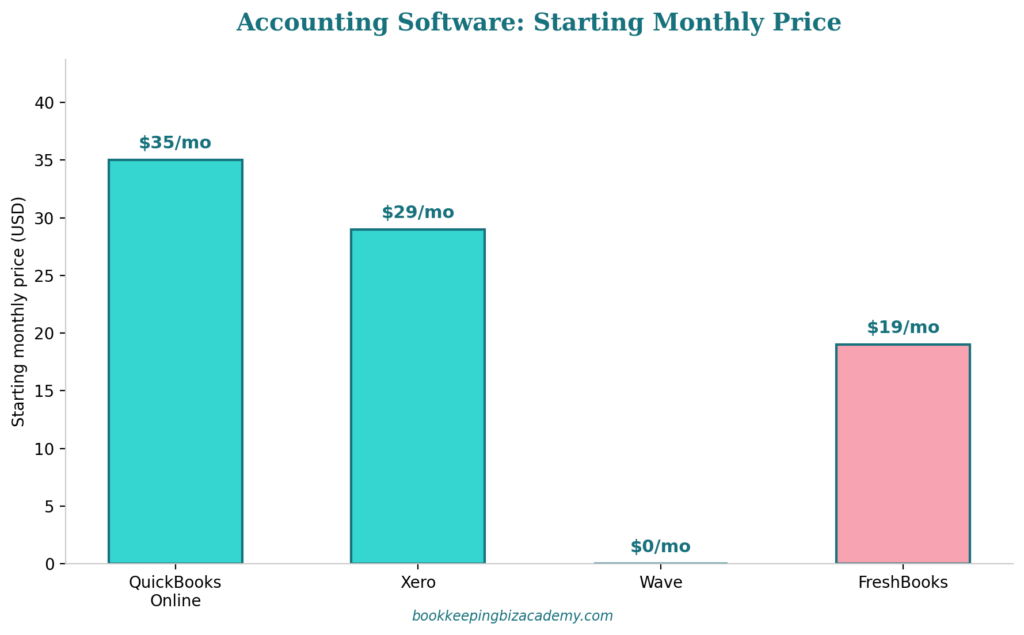
The plan tier mistake is where we see the most damage. QuickBooks Online Simple Start ($35/month as of this writing) doesn’t include bill pay tracking or job costing by class. If your client needs either of those and you put them on Simple Start to save them $30 a month, you’re the one who eats that decision every single reconciliation cycle.
Xero: The Better Fit for These Specific Situations
Xero gets recommended less often in the U.S. market, mostly because the ProAdvisor-equivalent ecosystem (Xero Advisor Certification) is smaller and fewer CPAs default to it. That’s a market-share fact, not a quality fact, and it’s worth separating the two when you’re making a recommendation.
Where Xero genuinely outperforms QuickBooks Online: multi-currency handling is native and cleaner, the unlimited-user model on every plan (versus QBO capping users by tier) makes it a better fit for clients who want broad staff access without paying for higher tiers, and the inventory tracking on mid-tier plans is more capable at a lower price point than QBO’s equivalent.
Where we’d steer a client away from Xero: if they’re already working with a CPA who only knows QuickBooks, you’re creating friction at tax time that the client will eventually blame on you. And if the client wants a large third-party app marketplace (certain point-of-sale systems, certain payroll providers), QBO’s ecosystem is still deeper.
There’s also a practical business-building reason to know Xero even if most of your clients end up on QuickBooks Online: it becomes a genuine differentiator when you’re marketing a niche practice. If you position yourself publicly as “the bookkeeper for import/export businesses” or “the bookkeeper for multi-currency consultants,” fluency in Xero isn’t optional supporting knowledge, it’s the core credential that makes your niche positioning credible. A bookkeeper who only knows QuickBooks Online but claims to specialize in multi-currency businesses is going to get exposed in the first sales call by any prospect who’s done their homework.
Wave and FreshBooks: When “Good Enough” Actually Wins
There’s a bias in the bookkeeping education world toward recommending “professional-grade” software regardless of client size, because it feels more legitimate to put a $12,000/year revenue solopreneur on the same platform as a $2M business. That instinct is costing bookkeepers clients.
Wave is free, and for a huge number of very early-stage service businesses — a new photographer, a freelance designer, a single-location dog walker — free is not a compromise, it’s correct. The reporting is basic and there’s no dedicated job costing, but if the client’s entire chart of accounts fits on one page, that limitation never gets triggered. We’ve seen bookkeepers lose these small clients entirely by insisting on a $35/month QuickBooks plan for a business bringing in $1,800 a month in revenue. The client does the math and decides to “just use a spreadsheet,” and you’ve lost the engagement to your own oversell.
FreshBooks sits in a useful middle ground: stronger invoicing and time-tracking than Wave, at $19/month starting, built specifically around service-based solopreneurs and small teams. If your ideal client niche is coaches, consultants, freelance creatives, or other time-billing service providers, FreshBooks often fits better than QuickBooks Online because the invoicing workflow was designed around exactly that use case, not bolted on afterward.
Our opinion, stated plainly: if you build your practice around a single “recommended software” answer regardless of client profile, you are optimizing for your own convenience, not the client’s outcome — and it will show up in your churn rate within 12 months.
There’s a pricing implication here too that’s worth naming directly. If your monthly retainer pricing assumes a client is capable of paying for QuickBooks Online Plus on top of your fee, and you’re targeting a niche where most prospects are pre-revenue or under $100,000 annually, you’re pricing yourself out of your own target market before the sales conversation even gets to your fee. We’ve watched bookkeepers wonder why their discovery calls with early-stage solopreneurs kept stalling, only to realize the software cost they were bundling into the recommendation was the actual objection, not their bookkeeping rate itself.
Accounting Software for Specific Bookkeeping Niches
Generic “best software” advice falls apart the moment you specialize, and specializing is exactly what we teach inside Bookkeeping Biz Academy because niche bookkeeping practices command higher retainers and refer better than generalist ones. So let’s get specific about four common niches.
For construction and contracting clients, job costing isn’t optional — it’s the entire point of the books. QuickBooks Online Plus or Advanced (not Essentials or Simple Start) is typically the right call because class and project tracking let you see profitability per job, which is the single number most contractor clients actually care about. Xero’s project tracking add-on is a legitimate alternative, but it’s an added cost on top of the subscription, whereas QBO Plus includes it. In our experience, this is the niche where under-tiering the software causes the most client frustration, because a contractor who can’t see per-job profitability will eventually ask you why they’re paying a bookkeeper at all.
For e-commerce clients, the software decision is really an integration decision. Whatever your client sells through (Shopify, Amazon, Etsy), you need clean sales tax and COGS syncing, which usually means a middleware tool like A2X sitting between the sales platform and your accounting software. QuickBooks Online and Xero both integrate with A2X equally well, so this is one of the few niches where the accounting platform choice matters less than your comfort with the integration layer. We’d rather see a bookkeeper who deeply understands A2X-to-QBO syncing than one who knows five accounting platforms shallowly.
For restaurant and food service clients, the volume of daily transactions from POS systems (Toast, Square, Clover) makes automated bank feed matching essential, and QuickBooks Online’s larger POS integration library gives it a real edge here over Xero. The mistake we see most often in this niche is bookkeepers manually entering daily sales summaries instead of setting up the POS integration properly at onboarding — a setup task that takes an hour upfront and saves 3-4 hours a month indefinitely.
For professional services and consultants (coaches, agencies, freelance creatives), the deciding factor is usually invoicing and time-tracking sophistication rather than inventory or job costing. This is where FreshBooks’ purpose-built workflow genuinely competes with QuickBooks Online, and where we’d push back on defaulting to QBO just because it’s the “standard” answer.
The Integration Question Nobody Asks Early Enough
Here’s an opinion that will save you real time: the accounting software itself matters less than what it needs to talk to. Payroll providers, payment processors, inventory systems, and industry-specific point-of-sale tools are where the actual friction lives, and this is the question most bookkeepers ask too late — usually after they’ve already onboarded the client onto a platform.
Before recommending software, ask what the client is already using for payroll and payments. If they’re locked into a payroll provider that only integrates cleanly with one platform, that constraint should come before your software preference, not after. We’ve seen bookkeepers commit a client to QuickBooks Online, only to discover the client’s existing payroll provider required a clunky CSV export/import workaround that added 30 minutes to every pay period — entirely avoidable if the integration question had been asked during the sales conversation instead of during onboarding.
The Four Questions That Actually Narrow This Down
Skip the feature-by-feature spreadsheet. Ask these four questions about the client instead, in this order, because each one eliminates options faster than a feature list ever will.
First: what does the client need to report on in 12 months, not today? A business planning to add a second location or a second revenue stream needs class or location tracking now, even if it feels like overkill on day one. Retrofitting that tracking after 8 months of transactions is expensive cleanup work that falls on you.
Second: who else touches these books? If a CPA, a lender, or a franchise parent company already requires a specific platform, that constraint overrides your personal preference every time. We’ve seen bookkeepers spend an hour pitching Xero to a client whose SBA loan covenant required QuickBooks reporting formats. That’s a wasted pitch before it started.
Third: what’s the client’s actual price sensitivity, separate from what you assume it is? Ask directly. A client who says “I just want this handled, I don’t care about the monthly software cost” is telling you to optimize for capability, not price. A client who mentions the software cost twice in one conversation is telling you the opposite.
Fourth: what do you, the bookkeeper, actually know well enough to support without googling every question? This is the one bookkeepers skip out of ego. If you know QuickBooks Online at an expert level and Xero only at a beginner level, recommending Xero to “be more versatile” often means slower, more error-prone work on your end for the first several months of that engagement — a cost the client is paying for indirectly through your extra time and your learning curve.
Run these four questions in order, and notice how fast the decision space narrows. Most bookkeepers try to hold all four variables in their head simultaneously and end up defaulting to whichever platform feels most familiar in the moment. Sequencing the questions forces the client’s actual situation to drive the answer instead of your own habits, which is the entire point of treating this as a framework rather than a preference.
The True Cost of Switching Software Later
Every bookkeeper eventually faces the conversation where a client outgrows their current software, and how you handle that moment says more about your professionalism than almost any other part of the engagement.
Here’s the number most bookkeepers underestimate: a full platform migration, done properly, typically takes between 8 and 20 hours depending on transaction volume and how many bank feed rules and prior categorizations need to be rebuilt. That’s not a “quick weekend project” — it’s a scoped engagement that deserves its own quote, separate from your monthly retainer. We’ve seen bookkeepers absorb migration work for free because they felt responsible for the client outgrowing the original software, when in reality the client’s business simply grew, which is a good problem, not a service failure.
The pattern we recommend: price migrations as flat-fee projects based on transaction volume and history length, not hourly, because clients respond better to a fixed number than an open-ended hourly estimate for work they don’t fully understand. A typical range we’ve seen work well is $500-$1,500 for a straightforward migration with under two years of history, and $1,500-$3,500 for anything involving inventory, payroll history, or more than three years of transactions.
The bigger strategic point: if you ask the four decision questions above at the start of the engagement, you dramatically reduce how often this conversation happens at all. Migrations triggered by genuine business growth are unavoidable and even a good sign of a healthy client relationship. Migrations triggered by a software mismatch you could have caught at onboarding are the ones that quietly damage trust, because the client starts wondering what else you got wrong.
| EXPERT PERSPECTIVE — CERTIFIED QUICKBOOKS PROADVISOR “Clients remember who recommended a software platform far longer than they remember why. If you position the initial software recommendation as a decision you made together, based on their specific business — not a default you reached for — a later migration conversation becomes ‘your business has grown’ instead of ‘you told me this would work.’ That framing difference has saved more client relationships than any technical fix I’ve made.” |
Add-On Apps That Matter More Than the Core Platform Choice
We’ll say something that might sound contrarian: for a meaningful share of bookkeeping clients, the accounting platform matters less than the app stack layered on top of it. QuickBooks Online and Xero both function as a foundation, and the tools you connect to that foundation are often where the actual time savings — or time drains — live.
Receipt and expense capture is the clearest example. A client manually forwarding receipts by email for you to enter one by one is paying for hours of your time that a $20/month tool like Dext or Hubdoc could eliminate almost entirely through automated data extraction. We’ve watched bookkeepers hesitate to recommend these add-ons because it feels like “one more subscription” for the client to manage, but the math rarely supports that hesitation: if the tool saves you 90 minutes a month and your time is worth $50-$75 an hour, a $20 tool pays for itself within the first billing cycle, and the client benefits from faster turnaround on their financials.
Sales tax automation is the second example, and it’s one of the most consistently underpriced risks in bookkeeping. A client selling across multiple states without an automated sales tax tool like Avalara or TaxJar connected to their accounting software is one nexus threshold away from a compliance problem that becomes your problem the moment the client asks why nobody caught it. This is especially relevant for e-commerce and multi-location retail clients, where economic nexus rules mean a client can trigger sales tax obligations in a state they’ve never physically operated in, purely based on sales volume.
Bank feed rule automation is the third, and the most overlooked. Both QuickBooks Online and Xero allow you to build categorization rules that auto-code recurring transactions, but very few bookkeepers invest the 30-60 minutes at onboarding to actually build a robust rule set. That upfront time investment is the difference between a 45-minute monthly reconciliation and a 3-hour one, for the exact same client, on the exact same software.
| 📌 FROM THE FIELD We took over a retail client whose previous bookkeeper had never built bank feed rules beyond the handful QuickBooks Online suggests automatically. Every month, roughly 40% of transactions required manual categorization by hand — the same vendors, the same categories, every single cycle. Building out a proper rule set took us about 50 minutes in the first month. Reconciliation time for that client dropped from just under 3 hours to under 45 minutes starting the very next cycle. That’s not a software upgrade. That’s the same software, used properly. |
Bank Feed Speed and the Metric Nobody Tracks
If you want a single number that tells you whether a piece of software is actually working for a client, track your own reconciliation time per client per month. Most bookkeepers track billable hours in aggregate but rarely break it down by client-and-platform combination, which means the software mismatch we’ve been describing throughout this article often hides in plain sight, buried inside a broader time-tracking total that looks “fine” on paper.
Here’s a benchmark worth knowing: a well-configured QuickBooks Online or Xero file, for a client with under 150 transactions a month and properly built bank feed rules, should take a competent bookkeeper somewhere between 30 and 90 minutes to fully reconcile in a typical month. If you’re consistently spending more than two hours on a client with that transaction volume, the issue is very rarely “bookkeeping is just slow” — it’s almost always a software configuration problem, a plan-tier mismatch, or an integration gap that’s forcing manual work the platform was supposed to automate.
This is also the number that should drive your pricing conversations. A bookkeeper charging a flat monthly retainer without tracking actual reconciliation time per client is flying blind on their own profitability — you might be making excellent margin on a well-configured QuickBooks Online client and losing money every month on a poorly configured one, without ever knowing it, because the invoice looks identical on both.
Where This Recommendation Usually Goes Wrong
The most expensive mistake is defaulting to the same software for every client regardless of fit, purely because it’s the tool you personally prefer. This shows up as bloated per-client hours that never quite make sense on your time tracker.
The second most expensive mistake is under-tiering a QuickBooks Online plan to save the client money, without disclosing what capability that trade-off removes. If a client later needs job costing or class tracking that their tier doesn’t support, that conversation should happen at onboarding, not at month six when you’re the one who has to explain the gap.
The third mistake: recommending software you haven’t personally used with a real client file. Watching a demo video is not the same as reconciling a messy bank feed inside that platform. If you’re pitching a tool you’ve never actually worked inside, you are the one absorbing the learning curve on the client’s clock, whether you bill for it or not.
The fourth mistake, and the one we see even experienced bookkeepers make: assuming the client’s previous software choice was wrong just because it’s unfamiliar to you. Sometimes a client is on a platform you don’t love for a completely legitimate reason — an integration you don’t know about, a franchise requirement, a tax preparer relationship. Migrating a client’s software without understanding why they landed there in the first place is how bookkeepers accidentally break something that was working.
The fifth mistake, and possibly the quietest one, is failing to revisit the software decision as the client’s business changes. A client who started as a $80,000-a-year solopreneur two years ago and is now running $600,000 through the books with three employees has almost certainly outgrown whatever plan they started on, but very few bookkeepers build in an annual “does this still fit” review. We recommend a brief software-fit check once a year, at the same time as any annual pricing review — it takes ten minutes, and it’s the single easiest way to catch a mismatch before it turns into six months of avoidable manual workarounds.
Best Accounting Software for Bookkeepers, by Client Type
We’ve laid out the framework, but if you’re building a niche bookkeeping practice and want a direct opinion rather than a “it depends” answer, here’s what we’d actually recommend, client type by client type, based on the patterns we’ve seen hold up across real engagements.
For a solo service provider under $150,000 in annual revenue with simple invoicing needs: FreshBooks or Wave, depending purely on price sensitivity. Don’t put this client on QuickBooks Online Plus to make your own life easier — you’ll lose the engagement to their own math within the first renewal cycle.
For a growing service business between $150,000 and $750,000 in revenue with a few employees or contractors: QuickBooks Online Essentials or Plus, depending on whether they need class tracking. This is the sweet spot where QBO’s ecosystem depth genuinely earns its higher price tag.
For a contractor or construction client of any size: QuickBooks Online Plus at minimum, because job costing isn’t a nice-to-have in this niche, it’s the deliverable the client is actually paying you to produce.
For an e-commerce seller on Shopify, Amazon, or Etsy: either QuickBooks Online or Xero, chosen based on your own integration comfort with A2X, since both connect equally well. Prioritize learning the integration deeply over switching the base platform.
For a multi-currency or multi-entity business: Xero, without much hesitation. This is the one client profile where we’d actively steer away from QuickBooks Online.
For a restaurant or retail client running a modern POS system: QuickBooks Online, primarily because of its deeper POS integration library, and because most restaurant clients will eventually need payroll integration that QBO handles more smoothly at scale.
This isn’t a universal ranking — it’s a set of defaults we’ve watched hold up across dozens of real client files, and defaults are exactly what should change the moment a client’s specific situation gives you a reason to deviate.
Frequently Asked Questions about How to Start a Bookkeeping Business From Home
Can I use different accounting software for different clients, or should I standardize on one platform, and how many platforms should a new bookkeeping business actually learn?
Standardizing on one or two platforms is smart for your own efficiency, but it shouldn’t come at the cost of forcing a bad fit onto a client. In our experience, most successful solo bookkeeping practices land on a primary platform (usually QuickBooks Online, given its market share) they use for 70-80% of clients, with a secondary platform (often Xero or FreshBooks) for the specific client profiles where it fits better. We recommend deep expertise in that one primary platform before marketing yourself broadly, with working familiarity in the second platform for whatever niche you’re targeting. Trying to master four or five platforms before your first client is a common form of productive-feeling procrastination — it delays actually launching, and most new bookkeepers end up using one platform for 90% of their early clients anyway. Supporting more than two platforms as a solo bookkeeper usually spreads your expertise too thin to be genuinely fast in any of them, and it shows up in slower turnaround times that clients notice even if they can’t name the cause.
How do I switch a client from one accounting software to another without losing historical data?
Most platforms offer either a native import tool or support migration through a third-party service, but the honest answer is that migrations are rarely as clean as vendors advertise. Budget for manual reconciliation of at least the trailing 12 months of transaction history, and always export a full backup of the old system’s data before starting, including a PDF export of every financial statement in case the import process alters historical categorization. Charge for migration work separately from your regular monthly retainer — it is genuinely more time-intensive than ongoing bookkeeping and should be priced as its own project, using the flat-fee ranges outlined earlier in this article rather than an open-ended hourly rate.
Is QuickBooks Online worth the extra cost compared to Wave for a very small client?
It depends entirely on what the client needs to report on now and in the near future, not on how “official” the software feels. If a client’s books fit comfortably on Wave’s free plan and they have no near-term plans to add complexity like job costing, multiple locations, or inventory tracking, moving them to a paid plan mainly benefits your own comfort, not their outcome. Reserve the upsell conversation for when a genuine capability gap appears.
Do I need to be certified in every accounting software platform I recommend to clients?
No, but you should have hands-on experience reconciling a real file in any platform before recommending it professionally. Certification programs like the QuickBooks ProAdvisor program are valuable for the training, community, and client referral pipeline they provide, but certification alone doesn’t replace the pattern recognition you build from actually working inside messy real-world files.
What’s the biggest red flag that a client is on the wrong accounting software?
The clearest signal is recurring manual workarounds — journal entries you make every single month to compensate for something the software should handle natively, like currency conversion, job costing, or class tracking. If you find yourself doing the same manual fix more than twice, that’s not a bookkeeping problem anymore, it’s a software mismatch, and it’s worth having the plan-tier or platform conversation with the client directly. A second, quieter red flag is a reconciliation time that keeps creeping up month over month even though the client’s transaction volume has stayed flat — that pattern almost always means bank feed rules have decayed or a new recurring vendor was never added to the automated categorization rules, and it’s worth a 20-minute audit before assuming the software itself is the problem.



Add A Comment