

Best CRM for Bookkeepers
Written by the Bookkeeping Biz Academy Team | Reviewed by a Certified QuickBooks ProAdvisor | Last Updated 2026 | 14 min read
| ABOUT THIS ARTICLE Bookkeeping Biz Academy is dedicated exclusively to helping bookkeepers start, grow, and scale successful bookkeeping businesses. We publish in-depth guides, real-world interviews with bookkeeping business owners, practical templates, and proven marketing strategies to help bookkeepers build profitable firms. This article has been reviewed by a Certified QuickBooks ProAdvisor who has onboarded and worked with 150+ clients in various niches. |
You lost a prospect last month and you don’t even know it happened.
They filled out your intake form, you meant to follow up in three days, and then a client emergency ate your week. By the time you circled back, they’d hired someone else — not because that bookkeeper was better, but because they replied first. That’s not a sales problem. That’s a systems problem, and the system that was missing is a CRM built for how bookkeeping practices actually operate.
Most bookkeepers treat a CRM as something “real businesses with sales teams” need, not a one-person practice. That thinking costs more revenue than almost any other operational gap we see, because in a service business built on trust and responsiveness, the tool that tracks your follow-ups is the tool that determines whether your pipeline actually converts.
This article isn’t a feature checklist. It’s an opinion about which CRM fits which stage of practice, which mistake is quietly costing you signed clients, and why the “just use a spreadsheet” advice you’ve probably heard is wrong past a certain point.
If you’re building a niche bookkeeping practice, your pipeline is smaller than a typical sales organization’s, which means every single lead matters disproportionately more. Losing one prospect out of six active conversations is a meaningfully worse outcome than losing one out of sixty, and yet most CRM advice online is written for the sixty-lead sales team, not the six-lead solo practice. That mismatch is exactly what this article is correcting.
The CRM Myth That’s Actually Costing You Clients
The myth goes like this: CRMs are for sales teams with reps working dozens of deals, not solo bookkeepers with a handful of prospects. It sounds reasonable. It’s also the exact belief that quietly costs new bookkeeping business owners signed clients, and here’s the reality underneath it.
The myth survives because it’s partly true — below about eight active leads in your pipeline at once, a spreadsheet genuinely works, and buying software to manage four prospects is solving a problem you don’t have yet. The part the myth gets wrong is what happens next: bookkeepers don’t upgrade when the math changes, because nothing dramatic signals that the math has changed. A spreadsheet doesn’t fail loudly. It fails by simply not reminding you, one quietly cooling lead at a time, until you look back and realize you’ve lost track of who you were supposed to follow up with three weeks ago.
The second part of the myth worth naming directly: generic sales CRMs (HubSpot, Salesforce, Pipedrive) and bookkeeping-specific CRMs (Karbon, Financial Cents) aren’t just different brands of the same tool — they’re built around different assumptions entirely. A generic sales CRM assumes a multi-touch outbound process with a rep working dozens of deals. A bookkeeping-specific CRM assumes a founder-led sales process that transitions almost immediately into client onboarding and service delivery. Treating them as interchangeable is how bookkeepers end up paying for features they’ll never touch.
| 📌 FROM THE FIELD We tracked our own pipeline in a spreadsheet for the first 14 months of building a bookkeeping business, and it worked fine — right up until we hit 11 simultaneous prospects at different stages. In the following six weeks, we lost track of two warm leads entirely. Both had gone quiet for over three weeks with no follow-up logged anywhere. One had already signed with a competitor by the time we circled back. That’s when the spreadsheet stopped being “simple” and started being expensive. |
Karbon: The Best Fit Once You Have Staff or Multiple Service Lines
Karbon is built specifically for accounting and bookkeeping firms, and it shows in details that generic CRMs miss entirely — email-to-client threading that ties directly to a client record, workflow templates built around monthly close cycles, and team-visible task assignment that matters the moment you’re not the only person touching a client file.
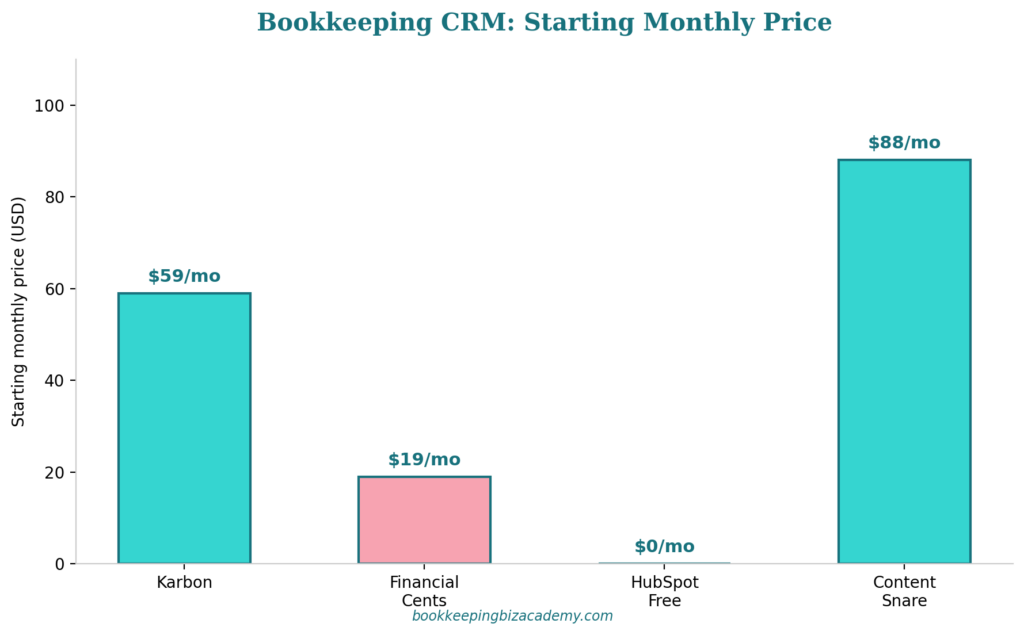
Here’s our honest take: Karbon is the right choice once you have at least one employee or contractor working client files alongside you, or once you’re running more than two distinct service lines (say, monthly bookkeeping plus quarterly advisory plus tax prep coordination) that each need their own pipeline stages. Below that threshold, you’re paying $59 per user per month for team collaboration features you don’t need yet.
It’s the wrong choice for a true solo practice in year one. We’ve watched new bookkeepers get seduced by Karbon’s polish during a free trial, sign up, and then use maybe 20% of its actual capability because there’s no team to collaborate with yet. That’s not a knock on Karbon — it’s a mismatch between a tool built for firms and a practice that’s still just one person.
There’s a specific scenario where Karbon earns its cost even for a smaller team: if you’re managing client work across genuinely different service lines with different deadlines and different staff responsible for each (say, one contractor handling monthly bookkeeping while you personally handle advisory calls), Karbon’s workflow separation prevents the cross-contamination of tasks that happens in simpler tools. Financial Cents can technically handle this too, but Karbon’s more mature permission and workflow-branching features make the separation cleaner as complexity grows.
| EXPERT PERSPECTIVE “The single feature in Karbon that justifies its price once you have a team is the shared inbox tied to client records. Before we adopted it, two different team members replied to the same client email with conflicting information, because neither could see the other had already responded. That kind of error erodes client trust fast, and it’s exactly the failure mode Karbon is built to prevent.” |
Financial Cents: The Better Fit for Solo and Small Practices
Financial Cents is the CRM we recommend most often to bookkeepers in their first two years of practice, and the reasoning is straightforward: it delivers roughly 80% of what Karbon does — client pipeline tracking, workflow templates, deadline tracking, document requests — at less than a third of the per-user cost.
Where Financial Cents genuinely earns its recommendation: the onboarding workflow templates are specifically built around bookkeeping engagement types (new client onboarding, monthly close, year-end cleanup), which means you’re not building automation from scratch the way you would in a generic CRM. The client-facing portal for document requests also eliminates a huge share of the “did you send me that bank statement yet” email back-and-forth that eats unbilled time.
Where we’d steer a growing practice away from Financial Cents: once you’re managing more than roughly 5-7 team members, Karbon’s more mature permission structure and reporting depth starts to matter more than the cost difference. But for the solo-to-small-team stage that most bookkeepers reading this are actually in, Financial Cents is very often the better financial decision, not just the cheaper one.
There’s a subtler advantage worth naming: Financial Cents’ pricing scales linearly per user without the tier jumps that some competitors build in, which makes budgeting predictable as you add your first one or two contractors. We’ve seen bookkeepers avoid bringing on help specifically because the software cost of scaling felt unpredictable, when in reality the per-seat cost was transparent the entire time — they just hadn’t checked.
| 📌 FROM THE FIELD A bookkeeper we worked with inside our program was manually tracking 22 active clients’ recurring deadlines in a paper planner before switching to Financial Cents. Within the first month, the built-in recurring task templates caught two deadlines she would have otherwise missed — including a payroll tax filing date for a client she’d onboarded only three weeks earlier and hadn’t yet memorized the cadence for. That’s an actual missed-deadline penalty avoided, in month one of using the tool. |
HubSpot Free and Generic CRMs: When “Good Enough” Actually Wins
There’s a strong bias in bookkeeping education toward recommending “proper” accounting-specific tools regardless of where someone is in their business, and that instinct costs new bookkeepers money they don’t need to spend yet.
HubSpot’s free CRM tier is a genuinely reasonable starting point for a bookkeeper with zero to five active prospects who just needs basic contact tracking, follow-up reminders, and a simple pipeline view. It wasn’t built for accounting workflows, so you won’t get bookkeeping-specific onboarding templates, but if your actual bottleneck is “I keep forgetting to follow up,” a free generic CRM solves that specific problem completely.
The mistake we see is bookkeepers skipping this stage entirely and either staying on a spreadsheet too long, or jumping straight to a $59/month accounting-specific CRM before they have enough pipeline volume to justify it. Our opinion, stated plainly: match the tool to your actual current lead volume, not to what feels most “professional.” A free CRM used consistently beats a premium CRM that intimidates you into under-using it.
Content Snare occupies a different niche worth naming separately — it’s not really a CRM in the pipeline-tracking sense, it’s a document collection tool that happens to solve a related problem extremely well. If your actual pain point is chasing clients for missing documents rather than managing a sales pipeline, Content Snare at $88/month flat (unlimited clients) may solve your real problem more directly than a CRM would.
One more honest note on generic CRMs: the “free forever” framing of HubSpot’s entry tier is real, but the moment you need more than very basic automation — multi-step nurture sequences, deeper reporting, or removing HubSpot branding — you’ll hit a paywall that escalates quickly, often faster than bookkeepers expect. We’d rather see someone start on the free tier with clear eyes about that ceiling than get surprised by it six months in and feel like they were misled about “free.”
CRM Needs by Bookkeeping Niche
Just like accounting software, CRM needs shift meaningfully depending on who you specialize in serving, and generic advice tends to flatten those differences in ways that cost you real conversion rate.
If you niche into construction or contracting clients, your pipeline conversations tend to be longer and more relationship-driven — contractors often take weeks to decide and want to see references from other contractors before signing. A CRM with strong note-taking and a longer nurture sequence (Financial Cents or Karbon, both of which support multi-stage pipelines with custom follow-up cadences) matters more here than one built for fast transactional signups.
If you niche into e-commerce clients, speed matters more than relationship depth. E-commerce founders often compare three or four bookkeepers in a single week and choose based on who responds fastest with the clearest answer. Here, automated instant-response sequences (an autoresponder triggered the moment a form is submitted, before you’ve even seen the lead) can be the difference between being first to respond and being an afterthought.
If you niche into professional services or coaches, referral tracking becomes disproportionately important, since this client type generates a large share of new business through word-of-mouth. A CRM that tags and reports on lead source (Financial Cents supports this natively) lets you see which referral relationships are actually producing signed clients versus which ones feel productive but aren’t converting — a distinction that matters when you’re deciding where to invest relationship-building time. We’ve seen bookkeepers assume a particular networking group was their best referral source purely based on how often they attended events, only to find, once they actually tagged and tracked lead source properly, that a single past client’s word-of-mouth had quietly outperformed a year of networking events combined.
| 📌 FROM THE FIELDA bookkeeper we worked with inside our program specialized in e-commerce clients and was losing prospects specifically because her average first-response time was 26 hours — she was manually checking a shared inbox once a day. After setting up an automated instant acknowledgment email through her CRM (not even a full response, just confirmation the inquiry was received and a specific callback window), her close rate on inbound leads increased in the very next month, without changing a single word of her actual sales pitch. The lag itself was the objection, not her positioning. |
The Integration Question: What Your CRM Needs to Connect To
The CRM itself matters less than what it needs to talk to, and this is a question bookkeepers ask too late in the process, usually after they’ve already committed to a platform.
Before choosing a CRM, ask whether you need it to integrate with your scheduling tool (Calendly, Acuity), your e-signature tool for engagement letters, and your accounting software for client record syncing. Financial Cents and Karbon both integrate with the major scheduling tools and e-signature platforms, but the depth of that integration varies — some sync one-way (calendar events show up in the CRM but not vice versa), while others sync bidirectionally.
We’ve seen bookkeepers choose a CRM based purely on price, only to discover three months in that their scheduling tool didn’t sync properly, meaning every discovery call booked through Calendly had to be manually re-entered into the CRM’s pipeline. That’s a 5-minute task that feels trivial in isolation and becomes a genuine time drain at 15-20 new leads a month.
Three Questions That Narrow This Fast
Skip the feature comparison chart for a moment and ask three sequencing questions instead, because they eliminate options faster than any feature list will.
First: how many active prospects do you typically have in your pipeline at once, right now, not in your five-year plan? Under 8, a free tool or even a well-maintained spreadsheet is genuinely fine. Between 8 and 20, a dedicated but affordable tool like Financial Cents starts paying for itself in prevented lost leads. Above 20, or with any team members involved, Karbon’s collaboration depth becomes worth the cost.
Second: is your actual bottleneck sales pipeline tracking, or document collection from existing clients? These get conflated constantly, but they’re different problems with different best tools. If you’re losing time chasing bank statements more than you’re losing leads to slow follow-up, a document-collection-first tool like Content Snare may matter more than a full CRM.
Third: are you solo, or do you have staff touching client communication? This is the single clearest line between “Financial Cents is enough” and “Karbon is worth the premium.” Team visibility into client threads isn’t a nice-to-have once more than one person is emailing clients — it’s the difference between a coordinated practice and one where clients get conflicting answers from different people. If you’re planning to bring on your first contractor within the next 6 months, it’s worth weighing that near-term shift now rather than choosing a solo-only tool and migrating again shortly after you scale.
Run these three questions before opening a single vendor comparison page, and you’ll usually already know which tier of tool you need before you’ve looked at a single feature list.
The True Cost of Switching CRMs Later
Migrating a CRM is quieter than migrating accounting software, but it’s not free, and bookkeepers routinely underestimate it. The real cost isn’t the data export — it’s the rebuilt muscle memory of a new workflow, plus every automation and template you’d built in the old system that doesn’t carry over automatically.
Budget 4-8 hours for a proper CRM migration if you have an established pipeline and workflow templates already built — re-creating onboarding sequences, recurring task templates, and pipeline stages from scratch in a new platform. That’s real, if invisible, cost, and it’s a strong argument for choosing more carefully the first time rather than treating early CRM choices as low-stakes because “it’s just contact management.”
The pattern we recommend: before switching, list every automation and template currently doing work for you in the old system, not just the contacts and deal stages. Losing the data is obvious and easy to migrate. Losing the workflow automation you built and forgot about is what actually costs you time three months after the switch, when you notice a follow-up sequence quietly isn’t running anymore.
This is also why we generally advise against switching CRMs reactively, in the middle of frustration with a specific feature gap. A calmer approach is to schedule an annual review of whether your current CRM still fits your practice’s size and complexity, the same way you might review your accounting software fit annually. Reactive switches, made in a moment of frustration, are far more likely to skip the careful audit step and lose quiet automations in the process.
| EXPERT PERSPECTIVE — CERTIFIED QUICKBOOKS PROADVISOR“The CRM migrations that go badly aren’t the ones where someone loses contact data — most platforms export that cleanly. They’re the ones where a bookkeeper switches platforms, feels a temporary productivity boost from the new tool’s shinier interface, and then three months later realizes half their automated follow-ups quietly stopped firing because nobody rebuilt them in the new system. Always audit what’s automated before you migrate, not after.” |
Best CRM for Bookkeepers, by Practice Stage
If you want a direct opinion rather than another “it depends,” here’s what we’d recommend based on where your practice actually is right now.
For a brand-new practice with under 8 prospects in the pipeline at any time: a free tool, either HubSpot’s free CRM tier or even a well-structured spreadsheet with calendar reminders built in. Paying for dedicated software at this stage is optimizing a problem you don’t have yet.
For a solo practice with 8-25 active prospects and clients, no staff: Financial Cents. The price point and bookkeeping-specific templates hit the sweet spot for this stage almost every time we’ve seen it tested against alternatives.
For a growing practice with 1-6 team members touching client communication: Financial Cents still works well up to the top of this range, with Karbon becoming worth the premium as you approach 5-7 people, purely because of the shared inbox and permission structure.
For a practice with more than 7 team members or multiple distinct service lines (bookkeeping plus advisory plus tax coordination): Karbon, without much hesitation. The collaboration depth and reporting maturity earn the higher per-user cost at this scale.
For a practice whose actual bottleneck is document collection rather than pipeline tracking, regardless of size: consider Content Snare alongside whichever CRM you choose, since it solves a genuinely different problem that neither Financial Cents nor Karbon addresses as directly.
Response Time: The Metric That Actually Predicts Conversion
If you want one number to track that tells you whether your CRM is actually working, it’s average first-response time to a new inbound lead, not total pipeline size or number of contacts logged.
Here’s a benchmark worth knowing: prospects researching bookkeeping services are typically comparing multiple providers within the same short window, often the same day. Responding within the first hour dramatically outperforms responding within 24 hours in terms of close rate, even when the actual pitch and pricing are identical. This is the single clearest reason a CRM with automated instant-acknowledgment sequences outperforms manual inbox-checking, regardless of how diligent you personally are about checking email.
Track this number monthly. If your average first-response time is creeping past 4-6 hours, that’s not a time-management problem to white-knuckle through — it’s a signal that your CRM’s automation isn’t doing the job it should be doing, or that you haven’t set up the instant-acknowledgment sequence at all. This is exactly the kind of gap that’s invisible until you measure it directly, because a full day of “I’ll get to it” feels reasonable in the moment and only shows up as lost revenue in aggregate, months later.
What a Missed Lead Actually Costs You
It’s worth running the actual math once, because the abstract idea of “a lost lead” doesn’t motivate behavior change nearly as effectively as a concrete number does.
If your average bookkeeping retainer is $500 a month and a typical client relationship lasts 3 years before churning for any reason, one lost prospect represents roughly $18,000 in lifetime revenue walking to a competitor. Compare that to the cost of the CRM that might have prevented the loss — $19 to $59 a month, or somewhere between $228 and $708 a year. A single prevented loss pays for the software for 25 to 80 years at that ratio. This isn’t a subtle cost-benefit case. It’s one of the most lopsided return-on-investment decisions available to a bookkeeping business owner, and it’s exactly why we push back hard on the instinct to delay CRM adoption to “save money.”
This math also explains why over-buying isn’t the real risk most bookkeepers should worry about. Even Karbon’s $59-per-user monthly cost is trivial against the lifetime value of a single retained client. The real risk is under-using whatever tool you pick — buying software and then not building the automation that actually prevents the lost-lead scenario in the first place. Cost is rarely the variable that determines whether a CRM pays for itself. Implementation discipline is.
The CRM Mistakes That Quietly Cost You Clients
When looking at the best CRM for bookkeepers the most expensive mistake is delaying CRM adoption past the point where you’re actually losing leads to poor follow-up, purely because “I’ve always used a spreadsheet and it’s worked so far.” The spreadsheet doesn’t fail loudly — it fails silently, one cold lead at a time, and you rarely connect the dots between a specific lost prospect and the tracking gap that caused it.
The second mistake is over-buying: adopting a $59-per-user tool built for teams when you’re a true solo practice with a handful of prospects a month. This isn’t just wasted spend — it’s wasted attention, because a tool with more surface area than you need often gets used less consistently than a simpler one that matches your actual workflow.
The third mistake is treating your CRM and your practice management software as two separate purchase decisions when they could be the same tool. Financial Cents and Karbon both function as CRM and practice management software simultaneously, which means bookkeepers sometimes end up paying for two overlapping tools (a dedicated CRM plus a separate project management tool) when one platform would have covered both jobs. We’ve seen bookkeepers paying for Asana or Trello for internal task tracking, plus a separate CRM for pipeline, plus a third tool for client onboarding checklists — three subscriptions solving one connected problem, when a single accounting-specific platform would have consolidated all three functions into one login and one source of truth.
The fourth mistake, and the one we see even among bookkeepers who’ve adopted a CRM correctly: never actually building out the automation. Buying Financial Cents and then manually tracking follow-ups the same way you did in a spreadsheet defeats the entire purpose. The value is in the automated reminders and templates, and skipping that setup step because it feels like “extra work upfront” is the single most common reason a CRM purchase fails to improve conversion rates.
| 📌 FROM THE FIELD We consulted with a bookkeeper who had purchased Karbon eight months earlier but was still manually emailing every client individually instead of using the platform’s templated communication sequences. When we asked why, the honest answer was “I never got around to setting it up properly.” She was paying for a tool being used as an expensive contact list. The setup investment — about three hours building out her actual workflow templates — is the same three hours she’d spent complaining about not having enough time to do it for eight months straight. |
The fifth mistake, and one that’s easy to miss because it feels like diligence rather than avoidance, is spending weeks trialing every available CRM before committing to one. We understand the instinct — nobody wants to pick wrong — but the actual cost of “wrong” for most CRMs at the solo-practice stage is a few hours of migration work six months later, not a catastrophic mistake. Bookkeepers who spend a month trial-hopping between Financial Cents, Karbon, and two other tools often lose more prospects to slow follow-up during the trial period than they would have lost by just picking the reasonably-fit option and starting immediately.

Frequently Asked Questions about How to Start a Bookkeeping Business From Home
Do I really need a CRM as a solo bookkeeper, or is a spreadsheet actually fine?
A spreadsheet is genuinely fine below roughly 8 active prospects in your pipeline at once, and buying software before that point is solving a problem you don’t have yet. The signal to upgrade isn’t a specific date or revenue milestone — it’s the moment you notice a lead went cold because you forgot to follow up, or you catch yourself unsure which stage a prospect is actually in. At that point, the cost of a missed lead almost always exceeds the monthly software cost, often within a single deal. A useful gut-check: if you can name every active prospect and their current status from memory without checking anything, you’re not there yet. The moment you have to think hard or guess, that’s your signal.
What’s the actual difference between Karbon and Financial Cents, beyond price?
Karbon is built with deeper team collaboration features — shared inboxes tied to client records, more granular permission structures, and reporting built for multi-person accountability. Financial Cents delivers strong solo and small-team functionality (pipeline tracking, workflow templates, client document requests) at roughly a third of the per-user cost. The practical dividing line is team size: below 5-7 people touching client communication, Financial Cents usually delivers comparable day-to-day value at a meaningfully lower cost, and above that threshold, Karbon’s collaboration depth starts to justify the premium. Neither is objectively “better” — they’re built for different stages of the same growth curve.
Can I use a generic CRM like HubSpot instead of an accounting-specific one?
Yes, especially in your first year, if your actual bottleneck is basic follow-up tracking rather than bookkeeping-specific workflow automation. HubSpot’s free tier handles contact tracking and pipeline stages competently. What you lose is bookkeeping-specific templates for onboarding sequences and recurring deadline tracking, which becomes more valuable as your client count grows, but isn’t essential when you’re managing a handful of prospects and clients by memory. Many bookkeepers we’ve worked with used a free generic CRM for their entire first year and only upgraded once the manual gaps became measurable in actual lost business.
How long does it actually take to set up a CRM properly for a bookkeeping practice?
Budget 3-5 hours for a proper initial setup — building your pipeline stages, onboarding workflow templates, and recurring task automations — rather than the 20-30 minutes it takes to just create an account and start manually entering contacts. That upfront time investment is exactly the difference between a CRM that changes your conversion rate and one that becomes an expensive digital contact list, which is the single most common failure mode we see. Treat that setup time as a scheduled project, not something you’ll get to eventually between client work, because “eventually” is exactly how tools end up half-configured for eight months.
Should my CRM and practice management software be the same tool?
In most cases, yes, if you’re a solo or small-team practice. Financial Cents and Karbon both handle CRM functions (pipeline, follow-ups) and practice management functions (recurring workflows, task tracking, deadlines) within the same platform, and running them together avoids the double-subscription trap of paying for two overlapping tools that don’t talk to each other. The exception is if your document-collection pain point is severe enough that a dedicated tool like Content Snare solves a real gap neither CRM handles as smoothly — in that case, running a focused document tool alongside your CRM is a reasonable exception to the “consolidate everything” rule.



Add A Comment